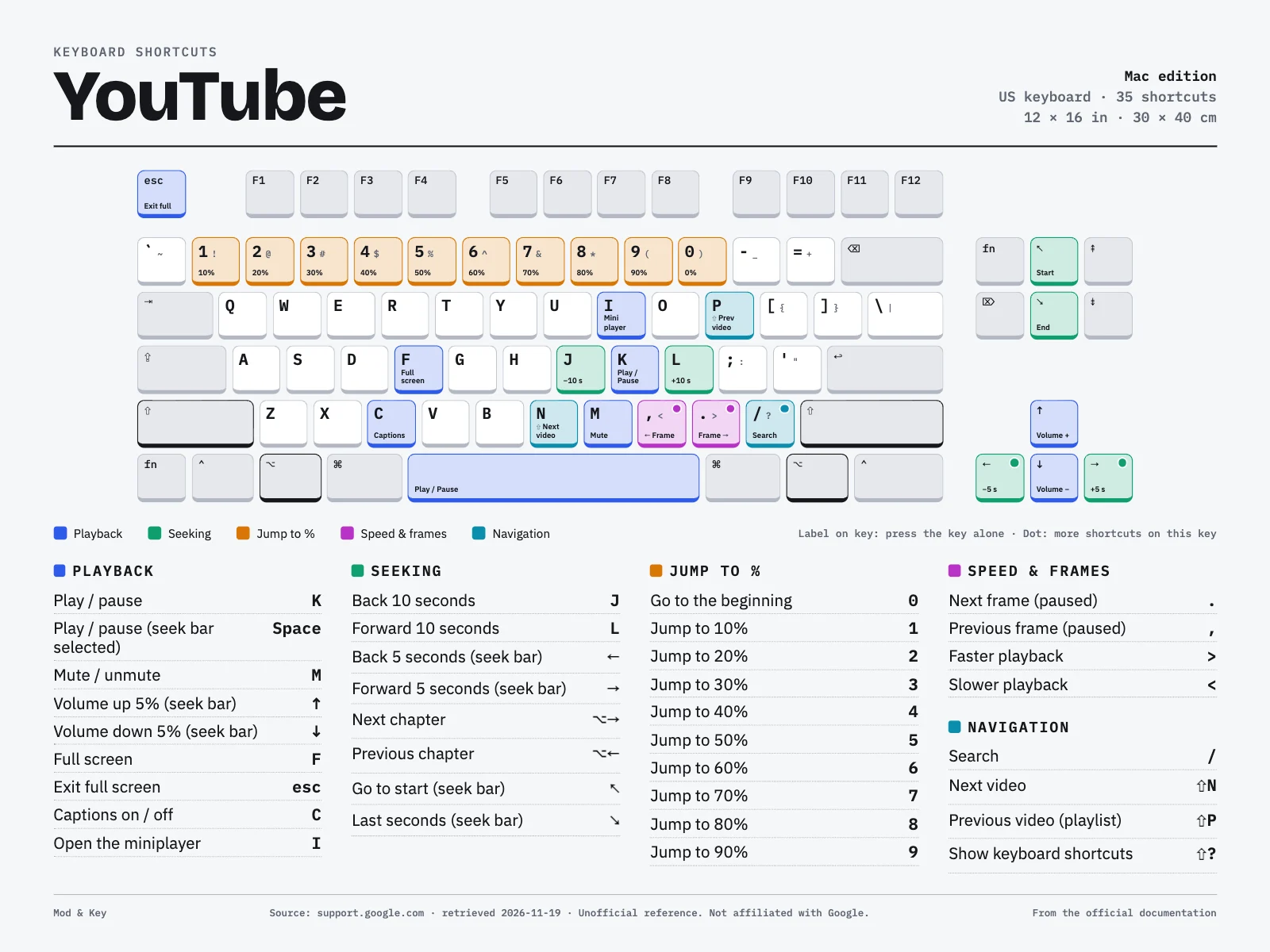
 Get it on your desk →
The most used YouTube shortcuts on Mac: Play / pause (K), Mute / unmute (M), Full screen (F), Captions on / off (C), Back 10 seconds (J). This page lists all 35, from the official documentation.
35 YouTube keyboard shortcuts for Mac, grouped into Playback, Seeking, Jump to %, Speed & frames, Navigation. Every key is copied from support.google.com (retrieved November 19, 2026) and shown on a real keyboard layout.
On Mac, 33 of these 35 shortcuts are the Windows ones with ⌘ in place of Ctrl; 2 are different, for example Next chapter (⌥→; Windows: Ctrl+→), Previous chapter (⌥←; Windows: Ctrl+←).
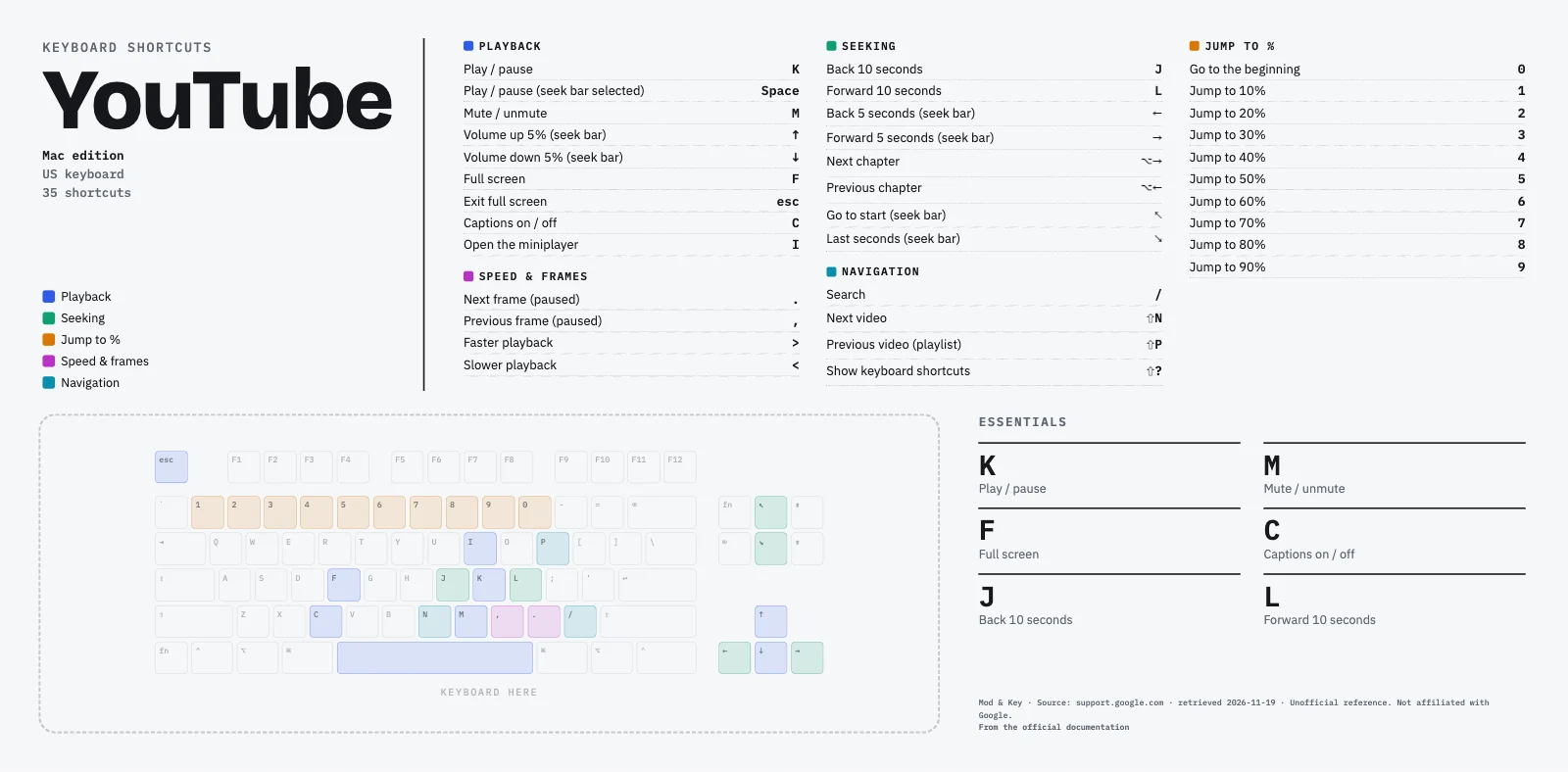
YouTube keyboard map
Pick your keyboard and a modifier. Keys with a shortcut light up; point at or tap a key to see everything on it. Try it: hold ⇧ Shift on your keyboard
More shortcuts on this key with other modifiers.
Key alone28 keys
All YouTube keyboard shortcuts for Mac
No shortcut matches that search.
Playback9
| Command | Shortcut |
|---|---|
| Play / pause | K |
| Play / pause (seek bar selected) | Space |
| Mute / unmute | M |
| Volume up 5% (seek bar) | ↑ |
| Volume down 5% (seek bar) | ↓ |
| Full screen | F |
| Exit full screen | esc |
| Captions on / off | C |
| Open the miniplayer | I |
Seeking8
| Command | Shortcut |
|---|---|
| Back 10 seconds | J |
| Forward 10 seconds | L |
| Back 5 seconds (seek bar) | ← |
| Forward 5 seconds (seek bar) | → |
| Next chapter | ⌥→ |
| Previous chapter | ⌥← |
| Go to start (seek bar) | ↖ |
| Last seconds (seek bar) | ↘ |
Jump to %10
| Command | Shortcut |
|---|---|
| Go to the beginning | 0 |
| Jump to 10% | 1 |
| Jump to 20% | 2 |
| Jump to 30% | 3 |
| Jump to 40% | 4 |
| Jump to 50% | 5 |
| Jump to 60% | 6 |
| Jump to 70% | 7 |
| Jump to 80% | 8 |
| Jump to 90% | 9 |
Speed & frames4
| Command | Shortcut |
|---|---|
| Next frame (paused) | . |
| Previous frame (paused) | , |
| Faster playback | > |
| Slower playback | < |
Navigation4
| Command | Shortcut |
|---|---|
| Search | / |
| Next video | ⇧N |
| Previous video (playlist) | ⇧P |
| Show keyboard shortcuts | ⇧? |
Source: Google · support.google.com · retrieved . Unofficial reference. Not affiliated with Google. How we source shortcuts →
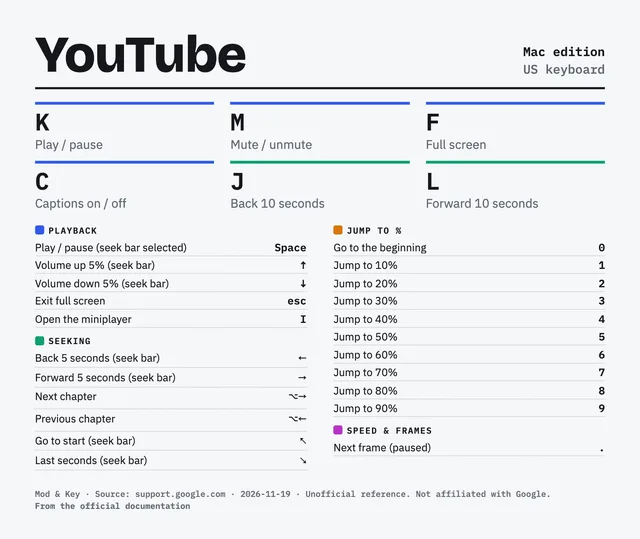
Free printable YouTube cheat sheet
The essential shortcuts on one page (PDF, 24 × 20 cm), for your keyboard and language.
YouTube shortcut questions
- What is the shortcut for “Play / pause” in YouTube on Mac?
- Press K. That is the shortcut for “Play / pause” in YouTube on Mac, as given in the official documentation.
- What is the shortcut for “Mute / unmute” in YouTube on Mac?
- Press M. That is the shortcut for “Mute / unmute” in YouTube on Mac, as given in the official documentation.
- What is the shortcut for “Full screen” in YouTube on Mac?
- Press F. That is the shortcut for “Full screen” in YouTube on Mac, as given in the official documentation.
- Where do these YouTube shortcuts come from?
- From Google’s official documentation at support.google.com, retrieved November 19, 2026. Every key is copied from there, never from other websites.