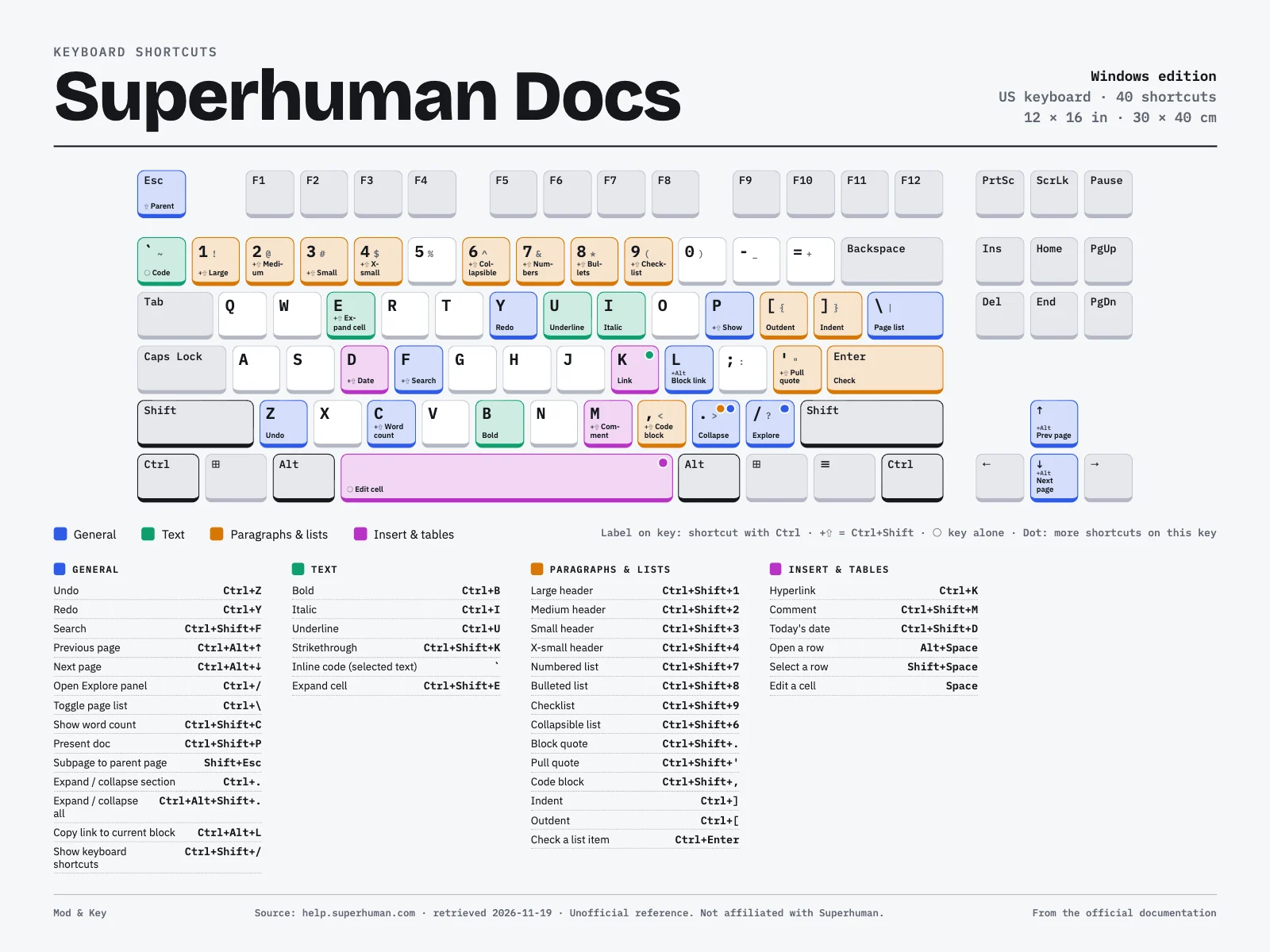
 Get it on your desk →
The most used Superhuman Docs shortcuts on Windows: Search (Ctrl+Shift+F), Toggle page list (Ctrl+\), Bold (Ctrl+B), Checklist (Ctrl+Shift+9), Hyperlink (Ctrl+K). This page lists all 40, from the official documentation.
40 Superhuman Docs keyboard shortcuts for Windows, grouped into General, Text, Paragraphs & lists, Insert & tables. Every key is copied from help.superhuman.com (retrieved November 19, 2026) and shown on a real keyboard layout.
On Windows, 27 of these 40 shortcuts are the Mac ones with Ctrl in place of ⌘; 13 are different, for example Redo (Ctrl+Y; Mac: ⇧⌘Z), Previous page (Ctrl+Alt+↑; Mac: ⌥⌘[), Next page (Ctrl+Alt+↓; Mac: ⌥⌘]).
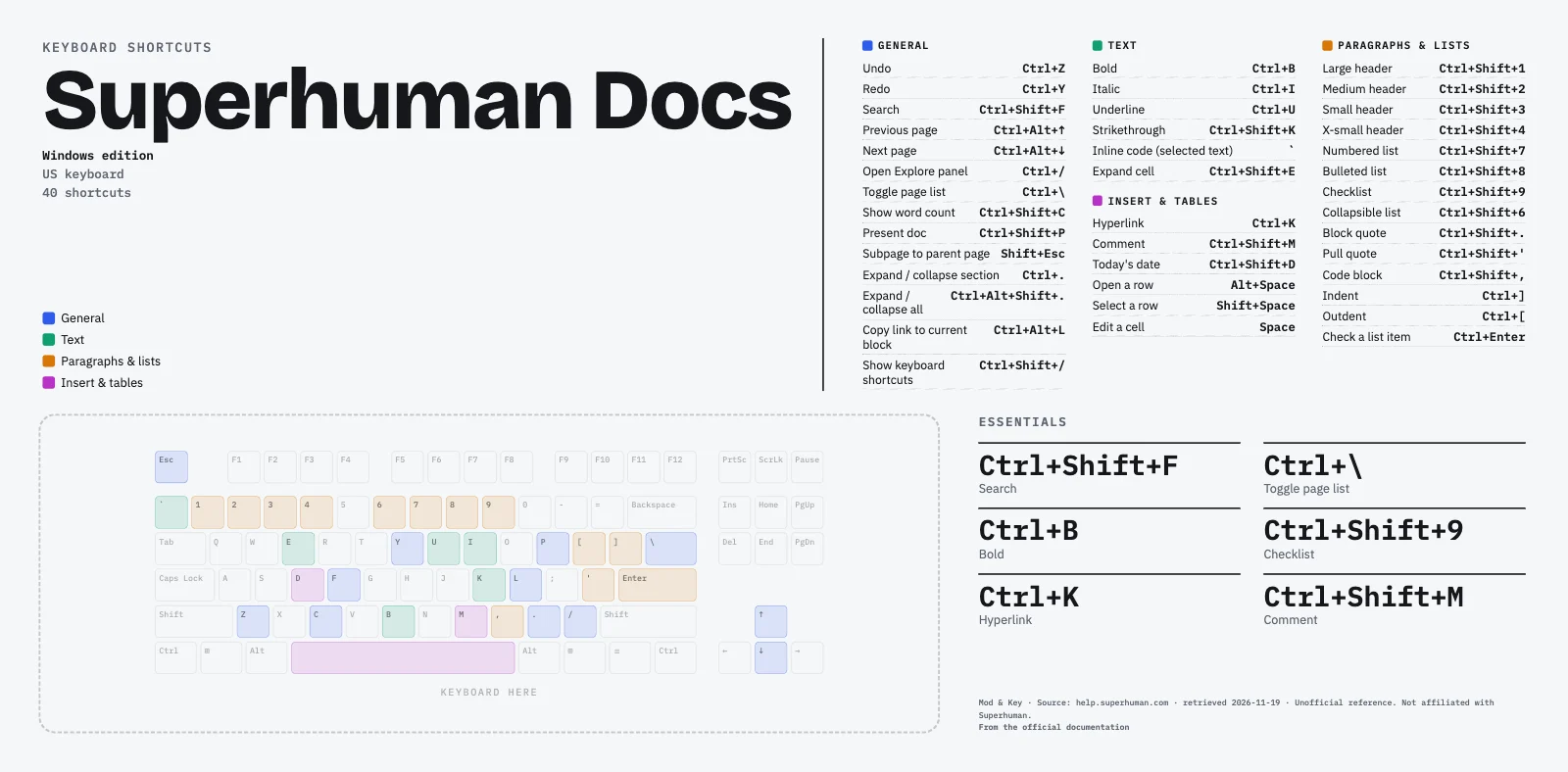
Superhuman Docs keyboard map
Pick your keyboard and a modifier. Keys with a shortcut light up; point at or tap a key to see everything on it. Try it: hold Ctrl on your keyboard
More shortcuts on this key with other modifiers.
With Ctrl+Shift19 keys
All Superhuman Docs keyboard shortcuts for Windows
No shortcut matches that search.
General14
| Command | Shortcut |
|---|---|
| Undo | Ctrl+Z |
| Redo | Ctrl+Y |
| Search | Ctrl+Shift+F |
| Previous page | Ctrl+Alt+↑ |
| Next page | Ctrl+Alt+↓ |
| Open Explore panel | Ctrl+/ |
| Toggle page list | Ctrl+\ |
| Show word count | Ctrl+Shift+C |
| Present doc | Ctrl+Shift+P |
| Subpage to parent page | Shift+Esc |
| Expand / collapse section | Ctrl+. |
| Expand / collapse all | Ctrl+Alt+Shift+. |
| Copy link to current block | Ctrl+Alt+L |
| Show keyboard shortcuts | Ctrl+Shift+/ |
Text6
| Command | Shortcut |
|---|---|
| Bold | Ctrl+B |
| Italic | Ctrl+I |
| Underline | Ctrl+U |
| Strikethrough | Ctrl+Shift+K |
| Inline code (selected text) | ` |
| Expand cell | Ctrl+Shift+E |
Paragraphs & lists14
| Command | Shortcut |
|---|---|
| Large header | Ctrl+Shift+1 |
| Medium header | Ctrl+Shift+2 |
| Small header | Ctrl+Shift+3 |
| X-small header | Ctrl+Shift+4 |
| Numbered list | Ctrl+Shift+7 |
| Bulleted list | Ctrl+Shift+8 |
| Checklist | Ctrl+Shift+9 |
| Collapsible list | Ctrl+Shift+6 |
| Block quote | Ctrl+Shift+. |
| Pull quote | Ctrl+Shift+' |
| Code block | Ctrl+Shift+, |
| Indent | Ctrl+] |
| Outdent | Ctrl+[ |
| Check a list item | Ctrl+Enter |
Insert & tables6
| Command | Shortcut |
|---|---|
| Hyperlink | Ctrl+K |
| Comment | Ctrl+Shift+M |
| Today's date | Ctrl+Shift+D |
| Open a row | Alt+Space |
| Select a row | Shift+Space |
| Edit a cell | Space |
Source: Superhuman · help.superhuman.com · retrieved . Unofficial reference. Not affiliated with Superhuman. How we source shortcuts →
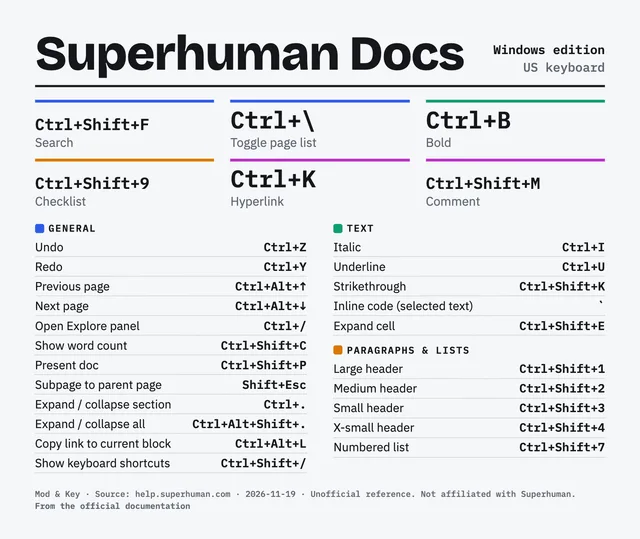
Free printable Superhuman Docs cheat sheet
The essential shortcuts on one page (PDF, 24 × 20 cm), for your keyboard and language.
Superhuman Docs shortcut questions
- What is the shortcut for “Search” in Superhuman Docs on Windows?
- Press Ctrl+Shift+F. That is the shortcut for “Search” in Superhuman Docs on Windows, as given in the official documentation.
- What is the shortcut for “Toggle page list” in Superhuman Docs on Windows?
- Press Ctrl+\. That is the shortcut for “Toggle page list” in Superhuman Docs on Windows, as given in the official documentation.
- What is the shortcut for “Bold” in Superhuman Docs on Windows?
- Press Ctrl+B. That is the shortcut for “Bold” in Superhuman Docs on Windows, as given in the official documentation.
- Where do these Superhuman Docs shortcuts come from?
- From Superhuman’s official documentation at help.superhuman.com, retrieved November 19, 2026. Every key is copied from there, never from other websites.