 Get it on your desk →
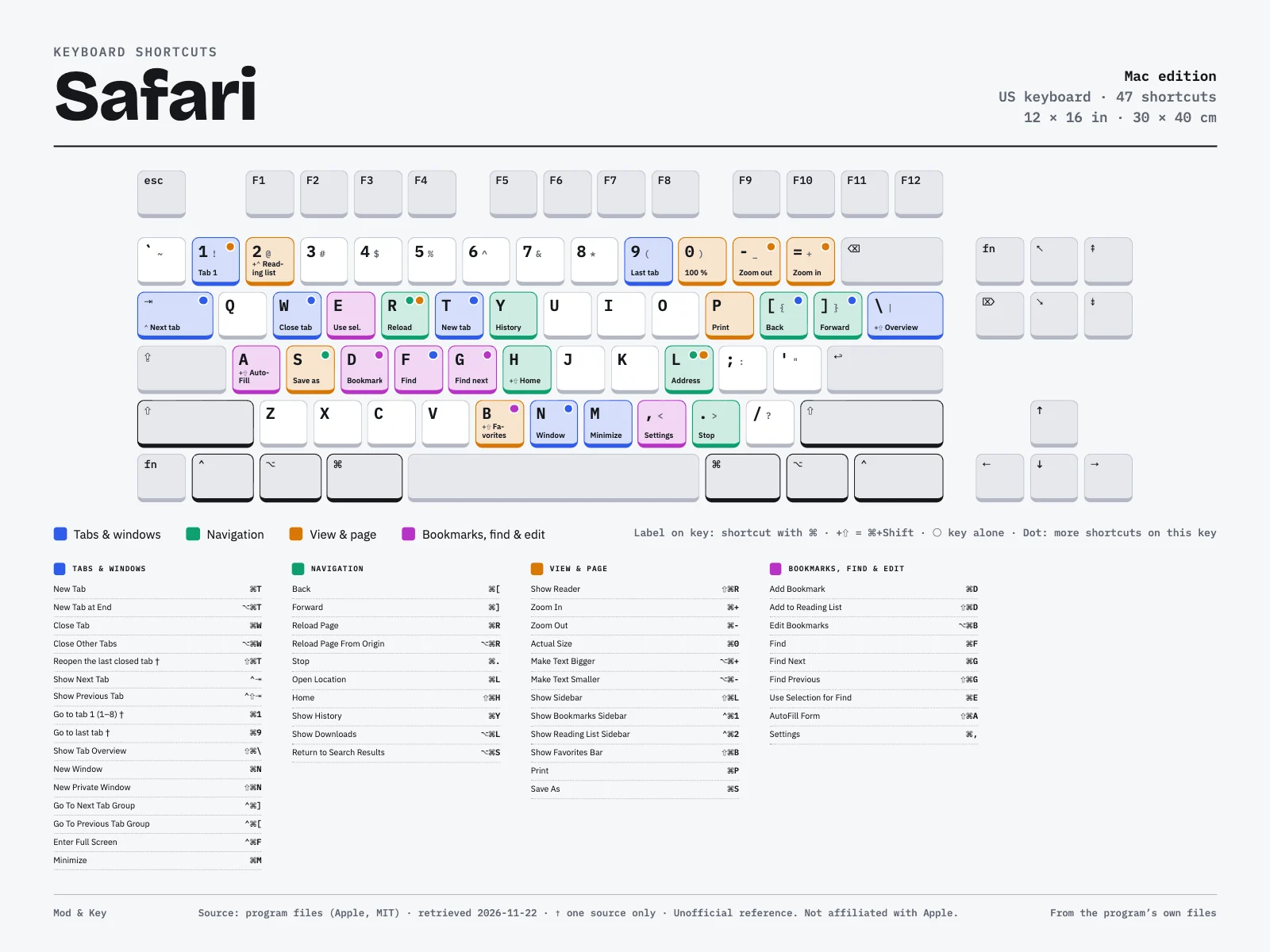
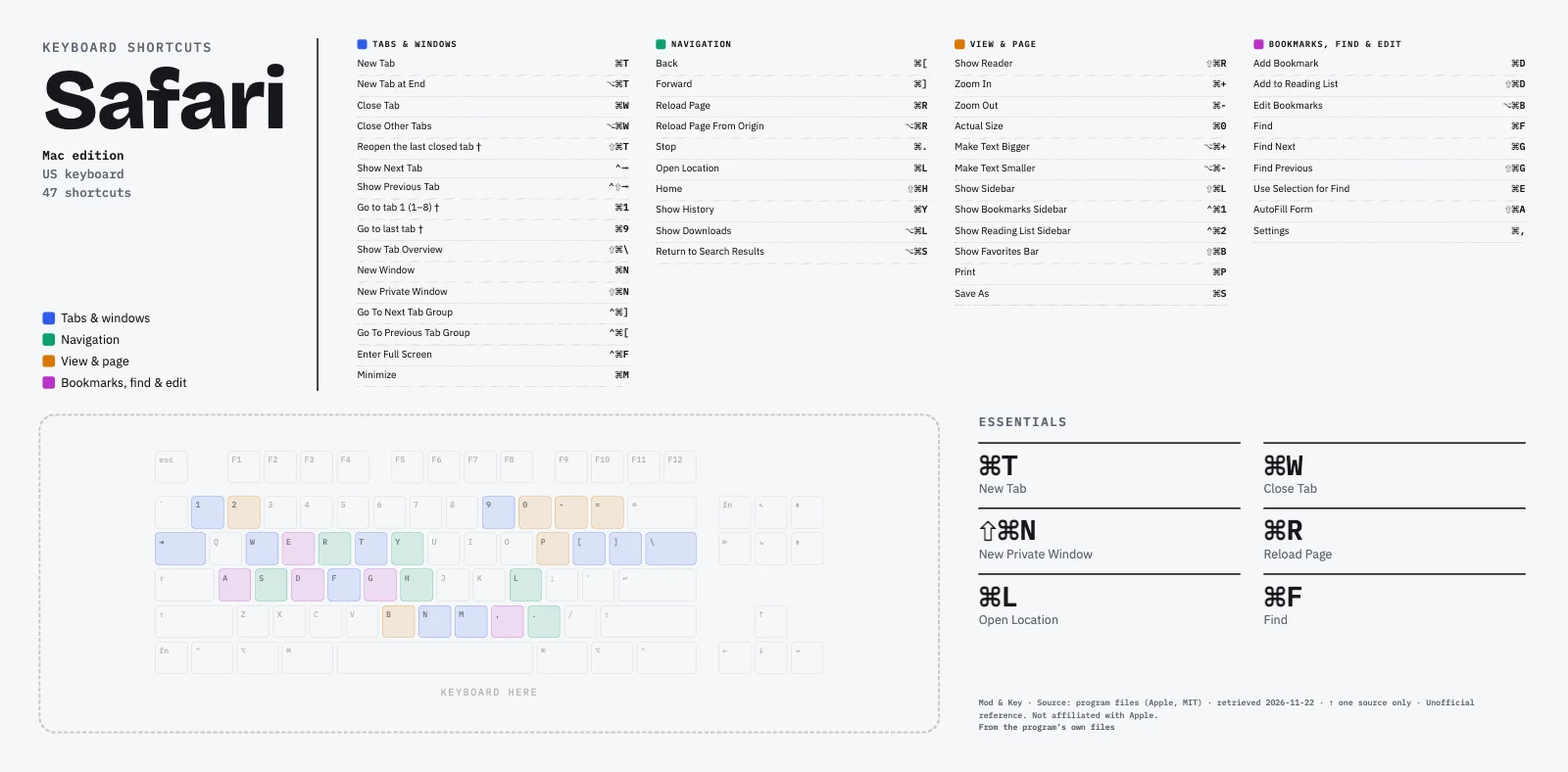
The most used Safari shortcuts on Mac: New Tab (⌘T), Close Tab (⌘W), New Private Window (⇧⌘N), Reload Page (⌘R), Open Location (⌘L). This page lists all 47, taken from the program’s own files and cross-checked between sources.
47 Safari keyboard shortcuts for Mac, grouped into Tabs & windows, Navigation, View & page, Bookmarks, find & edit. Taken from the program’s own files (Apple, MIT) (retrieved November 22, 2026) and shown on a real keyboard layout.
Safari keyboard map
Pick your keyboard and a modifier. Keys with a shortcut light up; point at or tap a key to see everything on it. Try it: hold ⌘ Cmd on your keyboard
More shortcuts on this key with other modifiers.
With ⌘22 keys
All Safari keyboard shortcuts for Mac
No shortcut matches that search.
Tabs & windows16
| Command | Shortcut |
|---|---|
| New Tab | ⌘T |
| New Tab at End | ⌥⌘T |
| Close Tab | ⌘W |
| Close Other Tabs | ⌥⌘W |
| Reopen the last closed tab † | ⇧⌘T |
| Show Next Tab | ⌃⇥ |
| Show Previous Tab | ⌃⇧⇥ |
| Go to tab 1 (1–8) † | ⌘1 |
| Go to last tab † | ⌘9 |
| Show Tab Overview | ⇧⌘\ |
| New Window | ⌘N |
| New Private Window | ⇧⌘N |
| Go To Next Tab Group | ⌃⌘] |
| Go To Previous Tab Group | ⌃⌘[ |
| Enter Full Screen | ⌃⌘F |
| Minimize | ⌘M |
Navigation10
| Command | Shortcut |
|---|---|
| Back | ⌘[ |
| Forward | ⌘] |
| Reload Page | ⌘R |
| Reload Page From Origin | ⌥⌘R |
| Stop | ⌘. |
| Open Location | ⌘L |
| Home | ⇧⌘H |
| Show History | ⌘Y |
| Show Downloads | ⌥⌘L |
| Return to Search Results | ⌥⌘S |
View & page12
| Command | Shortcut |
|---|---|
| Show Reader | ⇧⌘R |
| Zoom In | ⌘+ |
| Zoom Out | ⌘- |
| Actual Size | ⌘0 |
| Make Text Bigger | ⌥⌘+ |
| Make Text Smaller | ⌥⌘- |
| Show Sidebar | ⇧⌘L |
| Show Bookmarks Sidebar | ⌃⌘1 |
| Show Reading List Sidebar | ⌃⌘2 |
| Show Favorites Bar | ⇧⌘B |
| ⌘P | |
| Save As | ⌘S |
Bookmarks, find & edit9
| Command | Shortcut |
|---|---|
| Add Bookmark | ⌘D |
| Add to Reading List | ⇧⌘D |
| Edit Bookmarks | ⌥⌘B |
| Find | ⌘F |
| Find Next | ⌘G |
| Find Previous | ⇧⌘G |
| Use Selection for Find | ⌘E |
| AutoFill Form | ⇧⌘A |
| Settings | ⌘, |
Sources: Safari for macOS: menu resources (MainMenu.nib, MainMenu.strings) (Apple); KeyMap by Kumar Deepak (MIT) · retrieved . † Only one source gives this shortcut; no second source confirms it yet. Unofficial reference. Not affiliated with Apple. How we source shortcuts →
Free printable Safari cheat sheet
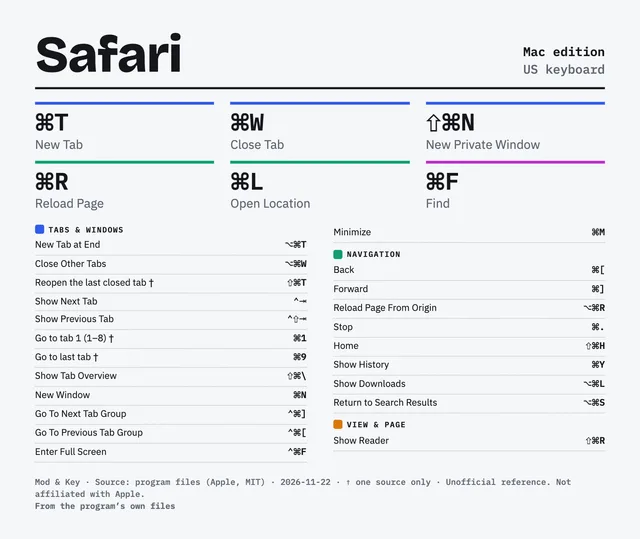
The essential shortcuts on one page (PDF, 24 × 20 cm), for your keyboard and language.
Safari shortcut questions
- What is the shortcut for “New Tab” in Safari on Mac?
- Press ⌘T. That is the shortcut for “New Tab” in Safari on Mac.
- What is the shortcut for “Close Tab” in Safari on Mac?
- Press ⌘W. That is the shortcut for “Close Tab” in Safari on Mac.
- What is the shortcut for “New Private Window” in Safari on Mac?
- Press ⇧⌘N. That is the shortcut for “New Private Window” in Safari on Mac.
- Where do these Safari shortcuts come from?
- From the program’s own files: Safari for macOS: menu resources (MainMenu.nib, MainMenu.strings); KeyMap by Kumar Deepak, retrieved November 22, 2026. Where sources disagree, the maker’s own material wins.