 Get it on your desk →
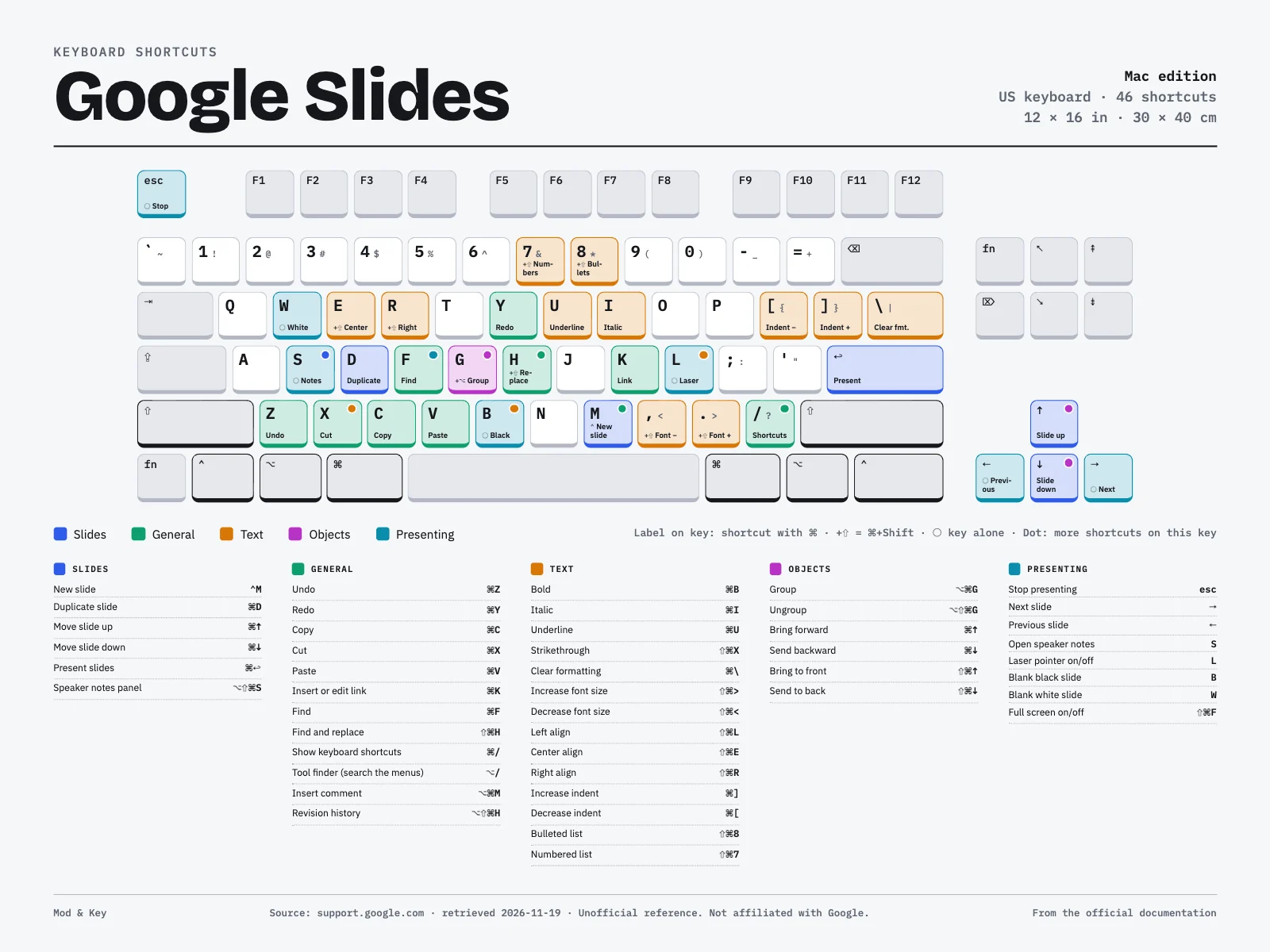
The most used Google Slides shortcuts on Mac: New slide (⌃M), Duplicate slide (⌘D), Present slides (⌘↩), Undo (⌘Z), Insert comment (⌥⌘M). This page lists all 46, from the official documentation.
46 Google Slides keyboard shortcuts for Mac, grouped into Slides, General, Text, Objects, Presenting. Every key is copied from support.google.com (retrieved November 19, 2026) and shown on a real keyboard layout.
On Mac, 41 of these 46 shortcuts are the Windows ones with ⌘ in place of Ctrl; 5 are different, for example New slide (⌃M; Windows: Ctrl+M), Present slides (⌘↩; Windows: Ctrl+F5), Find and replace (⇧⌘H; Windows: Ctrl+H).
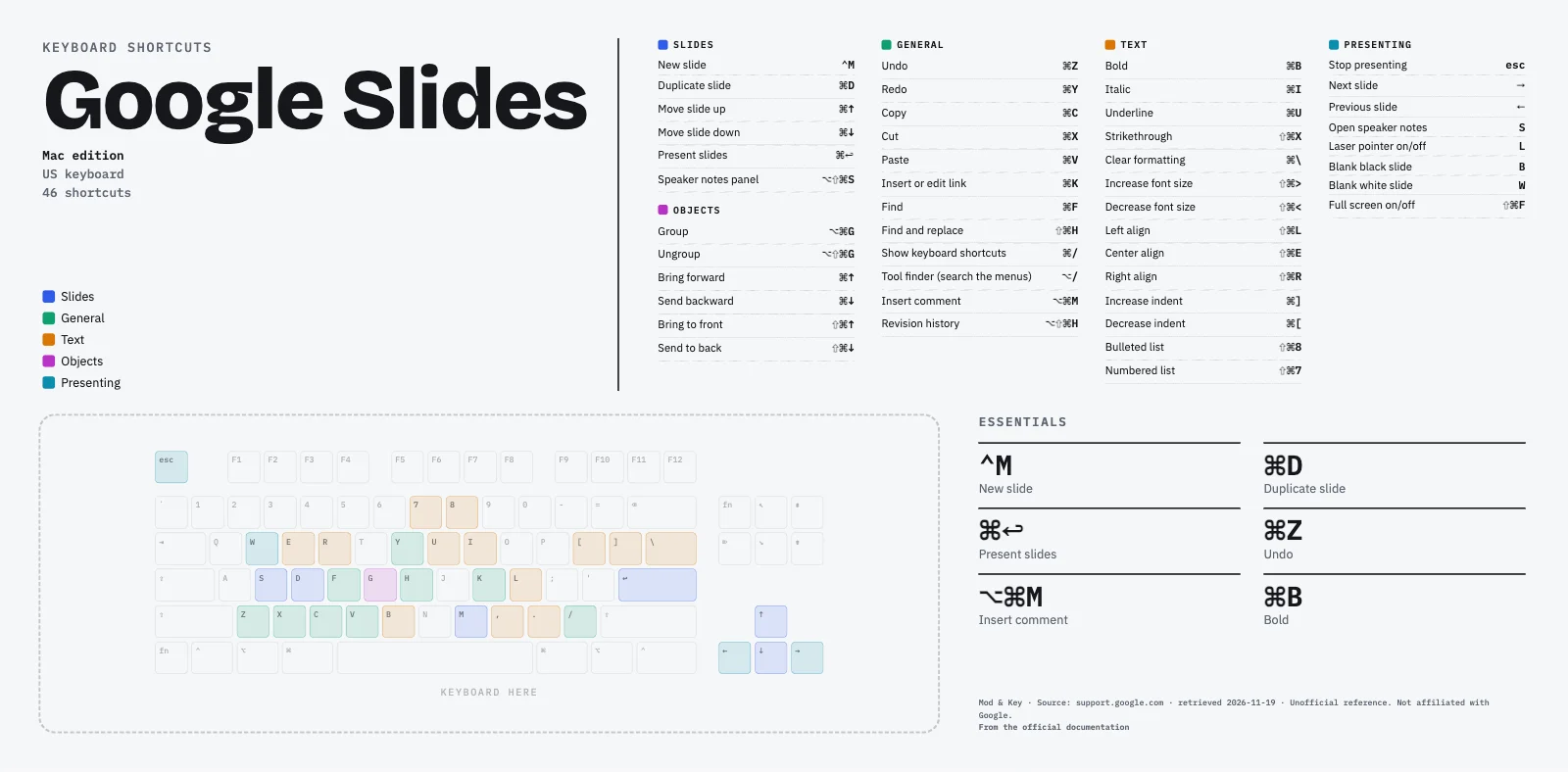
Google Slides keyboard map
Pick your keyboard and a modifier. Keys with a shortcut light up; point at or tap a key to see everything on it. Try it: hold ⌘ Cmd on your keyboard
More shortcuts on this key with other modifiers.
With ⌘18 keys
All Google Slides keyboard shortcuts for Mac
No shortcut matches that search.
Slides6
| Command | Shortcut |
|---|---|
| New slide | ⌃M |
| Duplicate slide | ⌘D |
| Move slide up | ⌘↑ |
| Move slide down | ⌘↓ |
| Present slides | ⌘↩ |
| Speaker notes panel | ⌥⇧⌘S |
General12
| Command | Shortcut |
|---|---|
| Undo | ⌘Z |
| Redo | ⌘Y |
| Copy | ⌘C |
| Cut | ⌘X |
| Paste | ⌘V |
| Insert or edit link | ⌘K |
| Find | ⌘F |
| Find and replace | ⇧⌘H |
| Show keyboard shortcuts | ⌘/ |
| Tool finder (search the menus) | ⌥/ |
| Insert comment | ⌥⌘M |
| Revision history | ⌥⇧⌘H |
Text14
| Command | Shortcut |
|---|---|
| Bold | ⌘B |
| Italic | ⌘I |
| Underline | ⌘U |
| Strikethrough | ⇧⌘X |
| Clear formatting | ⌘\ |
| Increase font size | ⇧⌘> |
| Decrease font size | ⇧⌘< |
| Left align | ⇧⌘L |
| Center align | ⇧⌘E |
| Right align | ⇧⌘R |
| Increase indent | ⌘] |
| Decrease indent | ⌘[ |
| Bulleted list | ⇧⌘8 |
| Numbered list | ⇧⌘7 |
Objects6
| Command | Shortcut |
|---|---|
| Group | ⌥⌘G |
| Ungroup | ⌥⇧⌘G |
| Bring forward | ⌘↑ |
| Send backward | ⌘↓ |
| Bring to front | ⇧⌘↑ |
| Send to back | ⇧⌘↓ |
Presenting8
| Command | Shortcut |
|---|---|
| Stop presenting | esc |
| Next slide | → |
| Previous slide | ← |
| Open speaker notes | S |
| Laser pointer on/off | L |
| Blank black slide | B |
| Blank white slide | W |
| Full screen on/off | ⇧⌘F |
Source: Google · support.google.com · retrieved . Unofficial reference. Not affiliated with Google. How we source shortcuts →
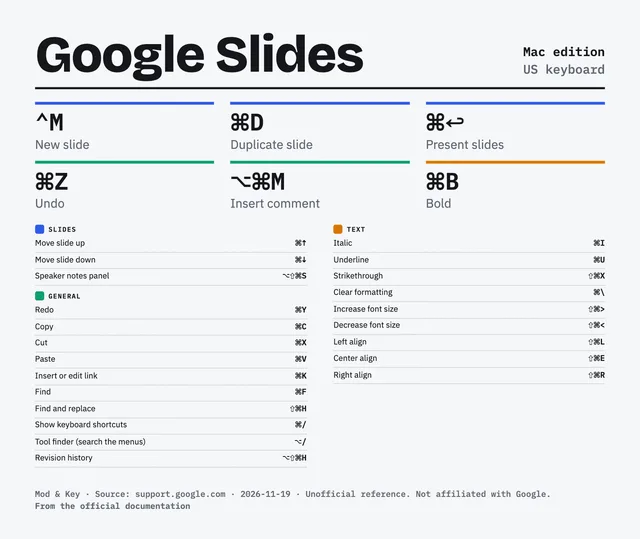
Free printable Google Slides cheat sheet
The essential shortcuts on one page (PDF, 24 × 20 cm), for your keyboard and language.
Google Slides shortcut questions
- What is the shortcut for “New slide” in Google Slides on Mac?
- Press ⌃M. That is the shortcut for “New slide” in Google Slides on Mac, as given in the official documentation.
- What is the shortcut for “Duplicate slide” in Google Slides on Mac?
- Press ⌘D. That is the shortcut for “Duplicate slide” in Google Slides on Mac, as given in the official documentation.
- What is the shortcut for “Present slides” in Google Slides on Mac?
- Press ⌘↩. That is the shortcut for “Present slides” in Google Slides on Mac, as given in the official documentation.
- Where do these Google Slides shortcuts come from?
- From Google’s official documentation at support.google.com, retrieved November 19, 2026. Every key is copied from there, never from other websites.