 Get it on your desk →
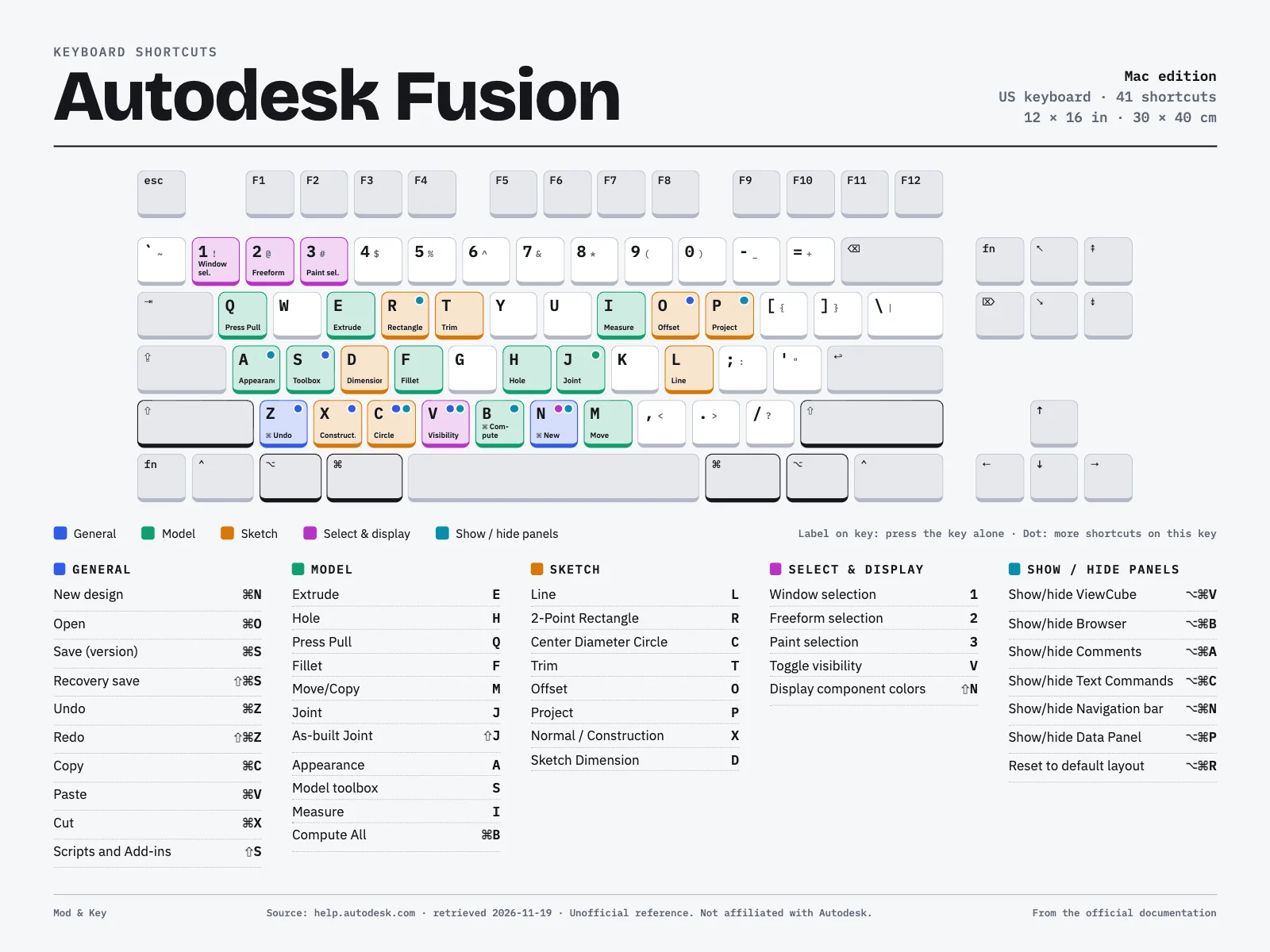
The most used Autodesk Fusion shortcuts on Mac: Save (version) (⌘S), Undo (⌘Z), Extrude (E), Move/Copy (M), Line (L). This page lists all 41, from the official documentation.
41 Autodesk Fusion keyboard shortcuts for Mac, grouped into General, Model, Sketch, Select & display, Show / hide panels. Every key is copied from help.autodesk.com (retrieved November 19, 2026) and shown on a real keyboard layout.
On Mac, 40 of these 41 shortcuts are the Windows ones with ⌘ in place of Ctrl; 1 are different, for example Redo (⇧⌘Z; Windows: Ctrl+Y).
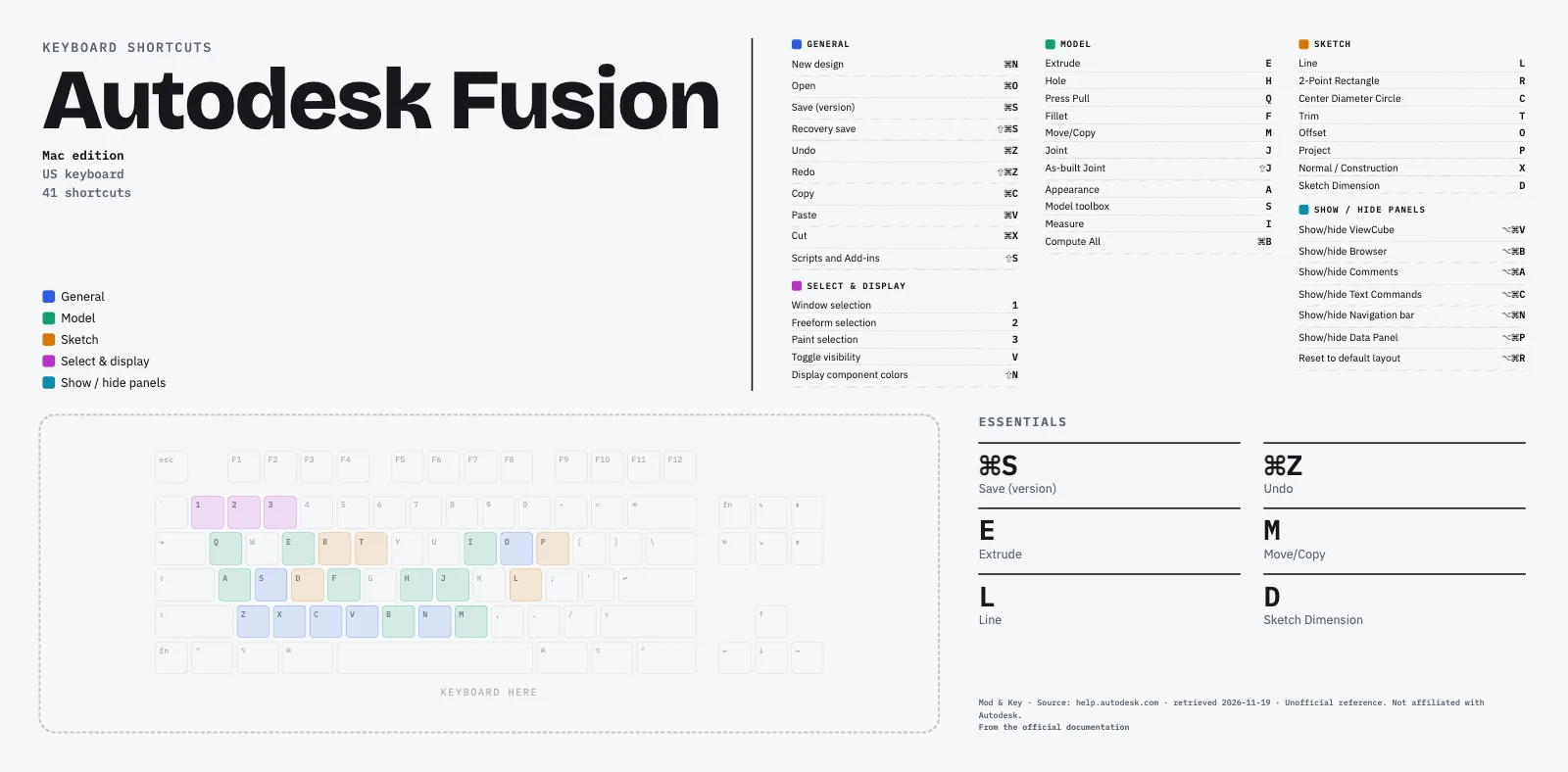
Autodesk Fusion keyboard map
Pick your keyboard and a modifier. Keys with a shortcut light up; point at or tap a key to see everything on it. Try it: hold ⌘ Cmd on your keyboard
More shortcuts on this key with other modifiers.
Key alone21 keys
All Autodesk Fusion keyboard shortcuts for Mac
No shortcut matches that search.
General10
| Command | Shortcut |
|---|---|
| New design | ⌘N |
| Open | ⌘O |
| Save (version) | ⌘S |
| Recovery save | ⇧⌘S |
| Undo | ⌘Z |
| Redo | ⇧⌘Z |
| Copy | ⌘C |
| Paste | ⌘V |
| Cut | ⌘X |
| Scripts and Add-ins | ⇧S |
Model11
| Command | Shortcut |
|---|---|
| Extrude | E |
| Hole | H |
| Press Pull | Q |
| Fillet | F |
| Move/Copy | M |
| Joint | J |
| As-built Joint | ⇧J |
| Appearance | A |
| Model toolbox | S |
| Measure | I |
| Compute All | ⌘B |
Sketch8
| Command | Shortcut |
|---|---|
| Line | L |
| 2-Point Rectangle | R |
| Center Diameter Circle | C |
| Trim | T |
| Offset | O |
| Project | P |
| Normal / Construction | X |
| Sketch Dimension | D |
Select & display5
| Command | Shortcut |
|---|---|
| Window selection | 1 |
| Freeform selection | 2 |
| Paint selection | 3 |
| Toggle visibility | V |
| Display component colors | ⇧N |
Show / hide panels7
| Command | Shortcut |
|---|---|
| Show/hide ViewCube | ⌥⌘V |
| Show/hide Browser | ⌥⌘B |
| Show/hide Comments | ⌥⌘A |
| Show/hide Text Commands | ⌥⌘C |
| Show/hide Navigation bar | ⌥⌘N |
| Show/hide Data Panel | ⌥⌘P |
| Reset to default layout | ⌥⌘R |
Source: Autodesk · help.autodesk.com · retrieved . Unofficial reference. Not affiliated with Autodesk. How we source shortcuts →
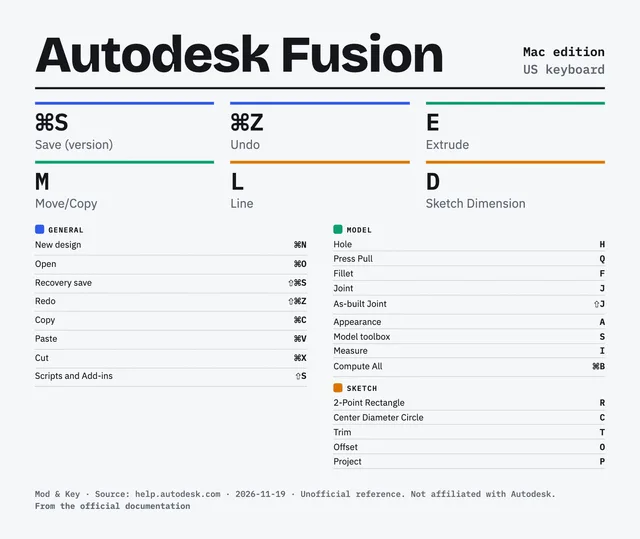
Free printable Autodesk Fusion cheat sheet
The essential shortcuts on one page (PDF, 24 × 20 cm), for your keyboard and language.
Autodesk Fusion shortcut questions
- What is the shortcut for “Save (version)” in Autodesk Fusion on Mac?
- Press ⌘S. That is the shortcut for “Save (version)” in Autodesk Fusion on Mac, as given in the official documentation.
- What is the shortcut for “Undo” in Autodesk Fusion on Mac?
- Press ⌘Z. That is the shortcut for “Undo” in Autodesk Fusion on Mac, as given in the official documentation.
- What is the shortcut for “Extrude” in Autodesk Fusion on Mac?
- Press E. That is the shortcut for “Extrude” in Autodesk Fusion on Mac, as given in the official documentation.
- Where do these Autodesk Fusion shortcuts come from?
- From Autodesk’s official documentation at help.autodesk.com, retrieved November 19, 2026. Every key is copied from there, never from other websites.