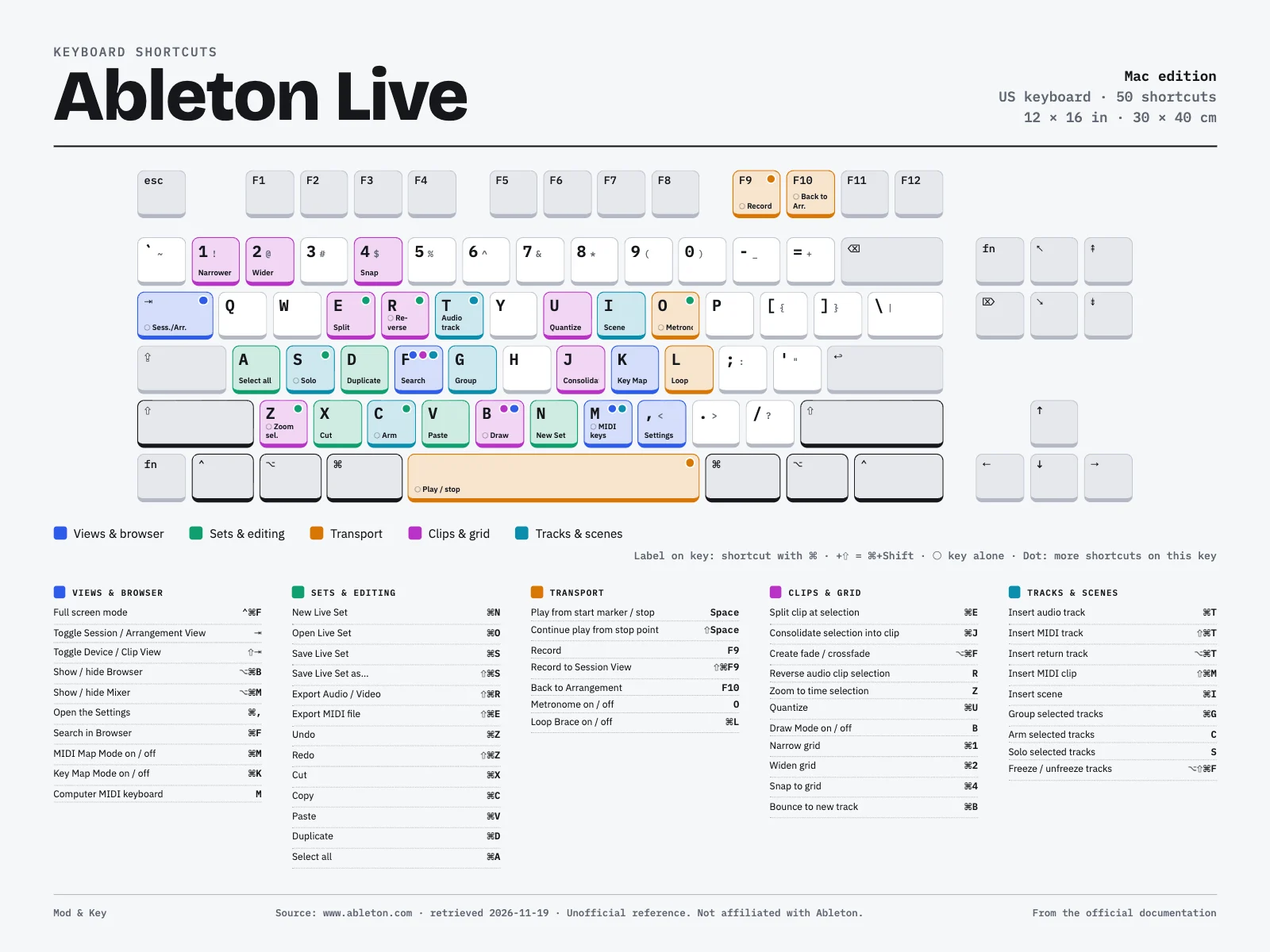
 Get it on your desk →
The most used Ableton Live shortcuts on Mac: Toggle Session / Arrangement View (⇥), Save Live Set (⌘S), Undo (⌘Z), Play from start marker / stop (Space), Record (F9). This page lists all 50, from the official documentation.
50 Ableton Live keyboard shortcuts for Mac, grouped into Views & browser, Sets & editing, Transport, Clips & grid, Tracks & scenes. Every key is copied from www.ableton.com (retrieved November 19, 2026) and shown on a real keyboard layout.
On Mac, 48 of these 50 shortcuts are the Windows ones with ⌘ in place of Ctrl; 2 are different, for example Full screen mode (⌃⌘F; Windows: F11), Redo (⇧⌘Z; Windows: Ctrl+Y).
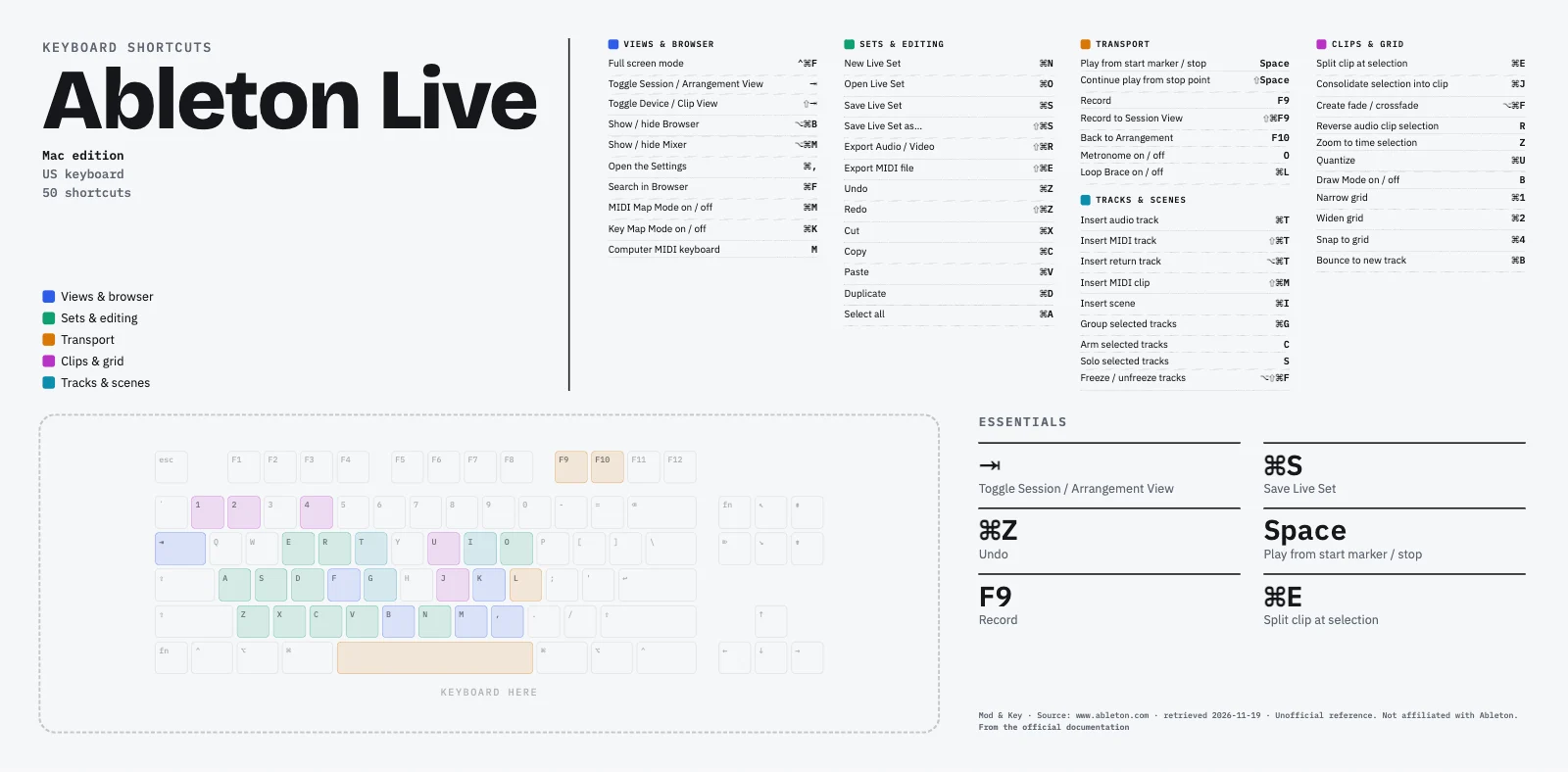
Ableton Live keyboard map
Pick your keyboard and a modifier. Keys with a shortcut light up; point at or tap a key to see everything on it. Try it: hold ⌘ Cmd on your keyboard
More shortcuts on this key with other modifiers.
With ⌘24 keys
All Ableton Live keyboard shortcuts for Mac
No shortcut matches that search.
Views & browser10
| Command | Shortcut |
|---|---|
| Full screen mode | ⌃⌘F |
| Toggle Session / Arrangement View | ⇥ |
| Toggle Device / Clip View | ⇧⇥ |
| Show / hide Browser | ⌥⌘B |
| Show / hide Mixer | ⌥⌘M |
| Open the Settings | ⌘, |
| Search in Browser | ⌘F |
| MIDI Map Mode on / off | ⌘M |
| Key Map Mode on / off | ⌘K |
| Computer MIDI keyboard | M |
Sets & editing13
| Command | Shortcut |
|---|---|
| New Live Set | ⌘N |
| Open Live Set | ⌘O |
| Save Live Set | ⌘S |
| Save Live Set as… | ⇧⌘S |
| Export Audio / Video | ⇧⌘R |
| Export MIDI file | ⇧⌘E |
| Undo | ⌘Z |
| Redo | ⇧⌘Z |
| Cut | ⌘X |
| Copy | ⌘C |
| Paste | ⌘V |
| Duplicate | ⌘D |
| Select all | ⌘A |
Transport7
| Command | Shortcut |
|---|---|
| Play from start marker / stop | Space |
| Continue play from stop point | ⇧Space |
| Record | F9 |
| Record to Session View | ⇧⌘F9 |
| Back to Arrangement | F10 |
| Metronome on / off | O |
| Loop Brace on / off | ⌘L |
Clips & grid11
| Command | Shortcut |
|---|---|
| Split clip at selection | ⌘E |
| Consolidate selection into clip | ⌘J |
| Create fade / crossfade | ⌥⌘F |
| Reverse audio clip selection | R |
| Zoom to time selection | Z |
| Quantize | ⌘U |
| Draw Mode on / off | B |
| Narrow grid | ⌘1 |
| Widen grid | ⌘2 |
| Snap to grid | ⌘4 |
| Bounce to new track | ⌘B |
Tracks & scenes9
| Command | Shortcut |
|---|---|
| Insert audio track | ⌘T |
| Insert MIDI track | ⇧⌘T |
| Insert return track | ⌥⌘T |
| Insert MIDI clip | ⇧⌘M |
| Insert scene | ⌘I |
| Group selected tracks | ⌘G |
| Arm selected tracks | C |
| Solo selected tracks | S |
| Freeze / unfreeze tracks | ⌥⇧⌘F |
Source: Ableton · www.ableton.com · retrieved . Unofficial reference. Not affiliated with Ableton. How we source shortcuts →
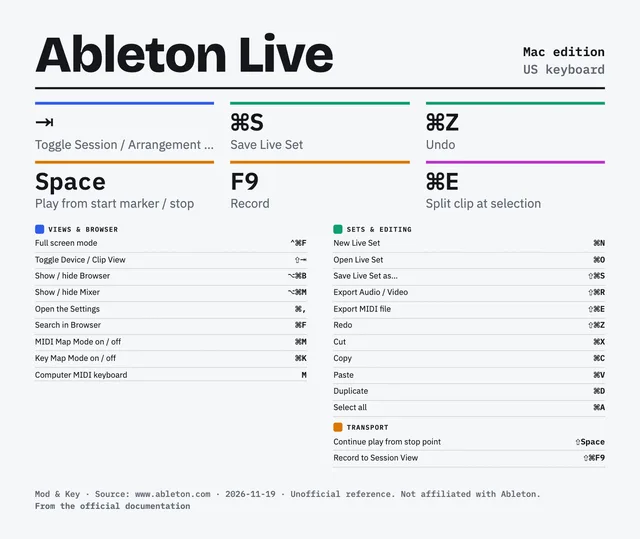
Free printable Ableton Live cheat sheet
The essential shortcuts on one page (PDF, 24 × 20 cm), for your keyboard and language.
Ableton Live shortcut questions
- What is the shortcut for “Toggle Session / Arrangement View” in Ableton Live on Mac?
- Press ⇥. That is the shortcut for “Toggle Session / Arrangement View” in Ableton Live on Mac, as given in the official documentation.
- What is the shortcut for “Save Live Set” in Ableton Live on Mac?
- Press ⌘S. That is the shortcut for “Save Live Set” in Ableton Live on Mac, as given in the official documentation.
- What is the shortcut for “Undo” in Ableton Live on Mac?
- Press ⌘Z. That is the shortcut for “Undo” in Ableton Live on Mac, as given in the official documentation.
- Where do these Ableton Live shortcuts come from?
- From Ableton’s official documentation at www.ableton.com, retrieved November 19, 2026. Every key is copied from there, never from other websites.